Harbor 1.0: Every Dev Server on Your Mac, One Keystroke Away
I built and shipped a native macOS menu-bar utility that shows every dev server listening on localhost — with live vitals, one-click actions, and a real notarized release. Here is what it does and what it took to ship it.
Every developer knows the moment: Error: listen EADDRINUSE: address already in use :::3000.
Something is squatting on the port. Maybe it is the Vite server from a project you closed two days ago. Maybe it is a Next.js process that survived its terminal. You paste the same incantation you always paste — lsof -ti :3000 | xargs kill — and hope it kills the right thing.
Harbor 1.0 exists so I never do that again.
Sixty seconds of Harbor — a motion demo built with Remotion, choreographing real panel footage from the release candidate.
What Harbor Is
Harbor is a native macOS menu-bar utility that shows every dev server listening on localhost — and lets you act on it. Click the bollard in your menu bar (or hit ⌘⌥P from anywhere) and you get a live panel: every listening port, which framework it is, how long it has been running, what it is costing you in CPU and memory, and an energy badge when something is quietly burning your battery.
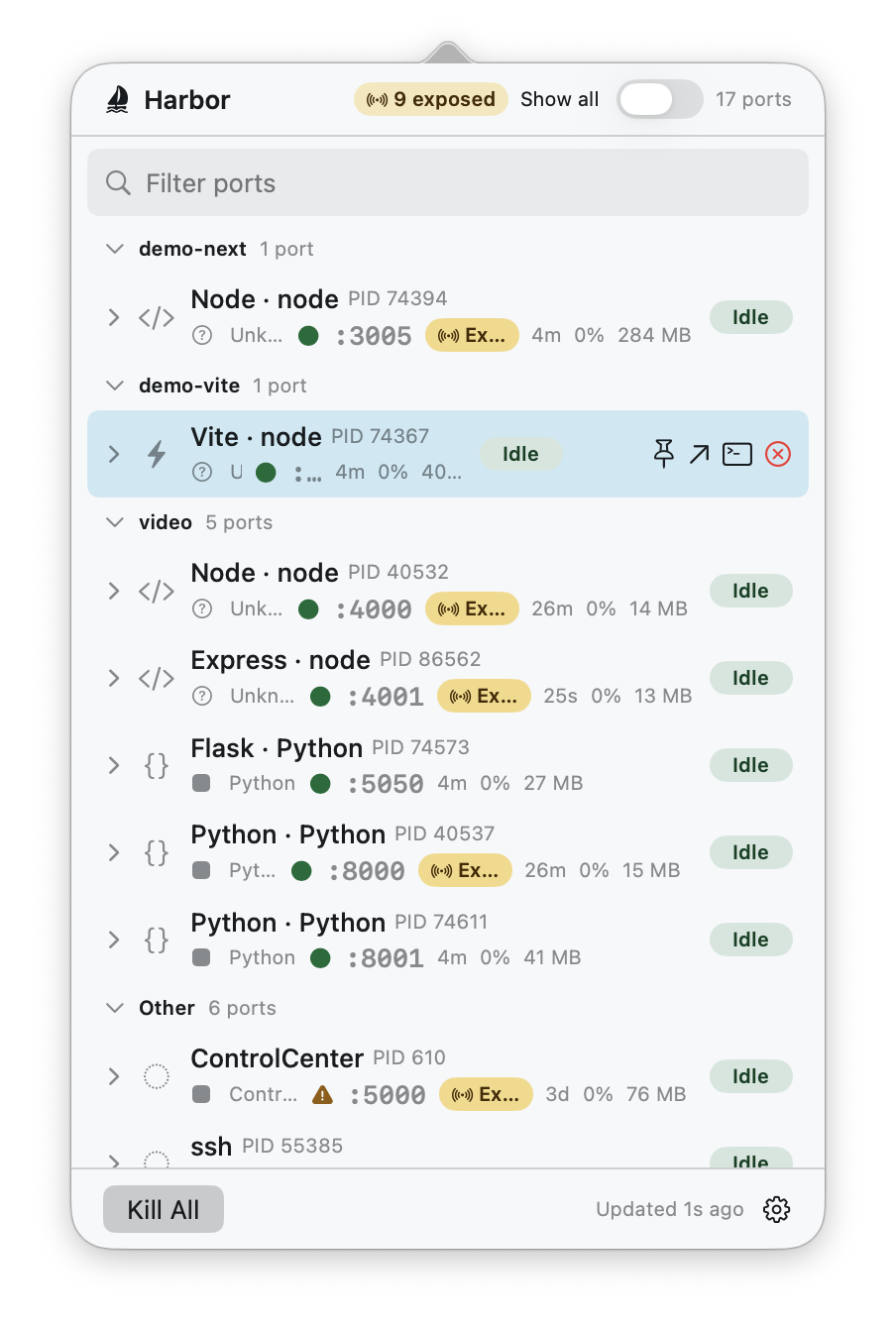
From that panel, everything is one action away:
- Kill a server — SIGTERM first, escalating to SIGKILL only if needed, with identity revalidation so a reused PID never takes an innocent process down.
- Kill All — with an enumerated confirmation that names exactly what it will terminate. No blind sweeps.
- Open in browser — scheme auto-detected, IPv6 loopback handled.
- Jump to terminal — Harbor resolves which terminal owns the process and activates it. Works across Terminal, iTerm2, Warp, Ghostty, WezTerm, kitty, Alacritty, and VS Code/Cursor terminals.
The whole thing is keyboard-first: arrow keys, type-to-filter, Return to act, Esc to dismiss. It looks and behaves like the system utility it is — light and dark, VoiceOver, Dynamic Type, reduced motion.
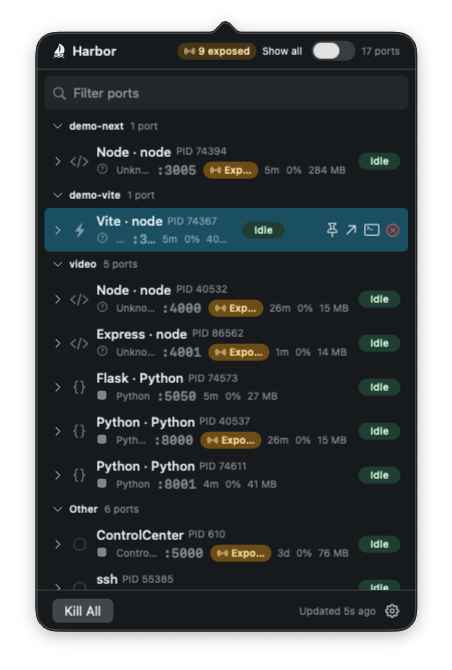
Seeing More Than a Port Number
A port number alone does not answer the actual question, which is: what is this and can I kill it?
Harbor detects the framework behind each listener — Vite, Next.js, Rails, Flask, Express, and more — and when a server hides behind a child worker (Next's dev server does this in some setups, as in the screenshots above), it falls back honestly to the runtime badge instead of guessing. System daemons do not pretend to be dev servers either: a well-known-port resolver names things like AirPlay and Screen Sharing, so the "Show all" view reads like an inventory instead of a mystery.
Every row expands into an inline inspector: full command line, working directory, the owning app, bind scope (is this listening on loopback, or exposed to your network?), and rolling CPU/memory sparklines drawn as discrete zero-anchored bars — so an idle process looks idle instead of looking like a seismograph.
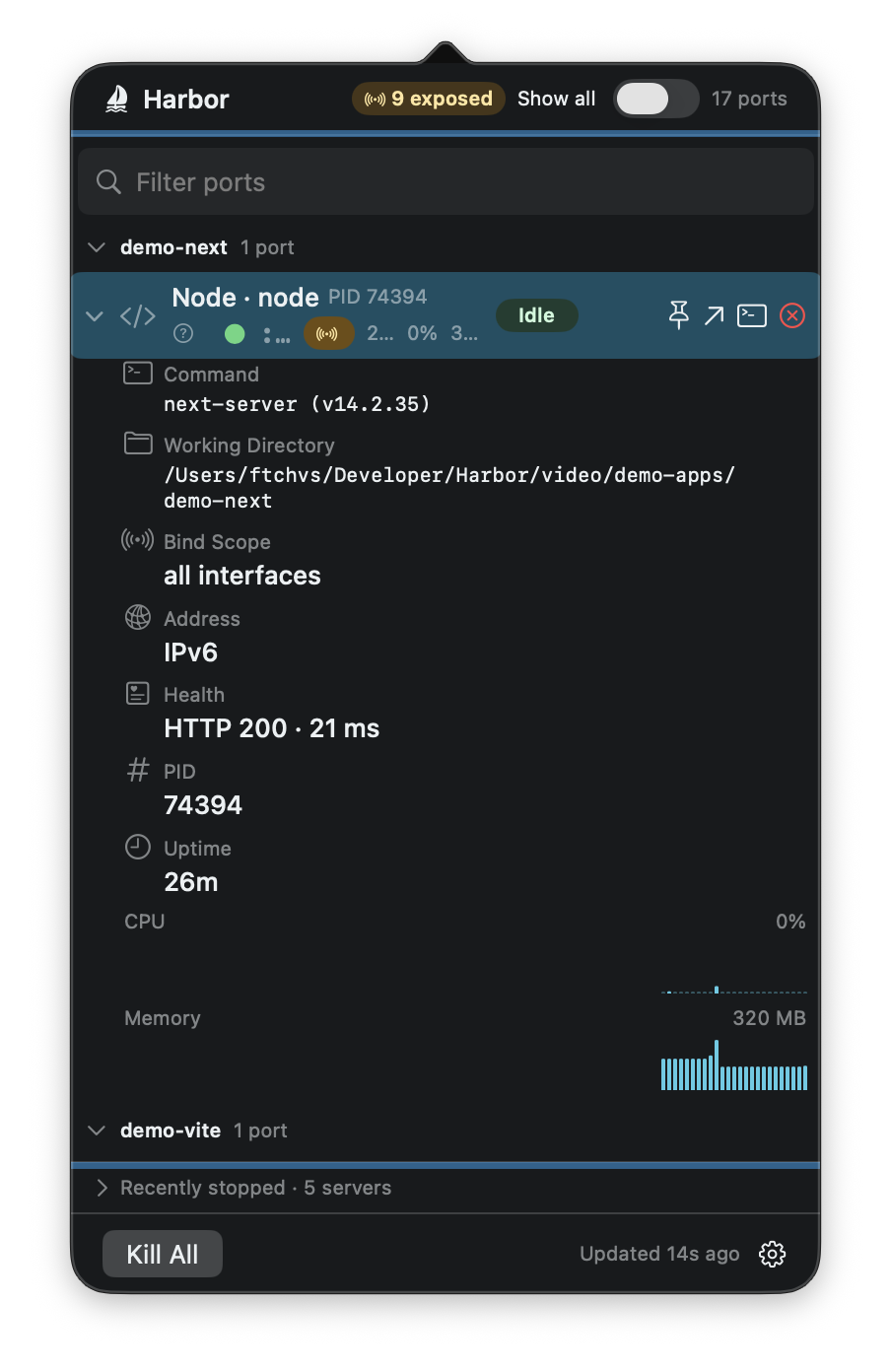
Exposure is a first-class signal. Anything bound beyond loopback gets flagged in the panel header — that exposed-count badge is the difference between a dev server and an accidental network service, surfaced before you go looking for it.
For the debugging sessions where the port is taken but nothing is listening, an opt-in view surfaces UDP sockets and stuck non-LISTEN TCP states (CLOSE_WAIT, FIN_WAIT) in a de-emphasized section. Off by default, because the default view should stay clean.
Local-First, Verifiably
Harbor's source is local-first: no telemetry and no account. User-initiated browser opens, update checks, and explicitly enabled network probes are the intended outbound paths. The v1.0.0 release record, however, still lists Developer ID signing, Apple notarization/stapling, production-hosted Sparkle proof, and clean-machine QA as incomplete external gates. Until immutable release evidence closes those gates, this post should not present them as finished. (Harbor 1.0.0 release record)
That distinction—source intent versus release proof—is exactly why the final checklist matters, which brings me to the part of this post I actually wanted to write.
The Build Story
Harbor is native Swift and SwiftUI — five SwiftPM modules with a strict acyclic dependency graph: pure models at the bottom, enumeration and process intelligence in a services layer, design system and UI above, one composition root at the top. Protocols live in the core; implementations live in services; the UI depends on abstractions. It is the boring architecture, and it is boring on purpose: every layer is unit-testable, and the test suite runs at over 650 tests.
Most of the implementation was agent-assisted — a team of coding agents working in parallel git worktrees, each change landing through the same gauntlet: full build, full test suite, lint, format, an adversarial review by a separate agent, and a human merge decision. The interesting lesson was not that agents write code. It is that review is where the quality lives.
Consider one feature: the opt-in view for UDP and non-listening sockets. The implementation agent produced a clean branch — green tests, careful conflict resolution across fourteen commits of drift, byte-for-byte compatibility when the toggle was off. It looked done. Then the review pass, run by a separate agent with no stake in the work, found four things: the settings toggle was wired to a code path the shipping app never called, so the entire feature was unreachable at runtime; Kill All had silently widened its blast radius to include the new subordinate rows; the lsof fallback parser misread connected sockets and would have flagged them as network-exposed; and ordinary TCP churn would have pinned the adaptive refresh loop at maximum frequency forever. Four real bugs, one of them destructive, in a branch every automated gate had blessed.
That pattern repeated all the way down. The writer is not the person who finds the problem — the skeptic is. Structuring the work so that a fresh set of eyes attacks every change before a human decides is the single highest-leverage thing in the whole workflow, and it is exactly as true for agents as it has always been for people.
Two bugs deserve their own sentences, because they are the kind you only meet when you ship for real.
First: the release pipeline signed the app inside the DMG but never signed the DMG container itself. Every automated gate was green until the first fully credentialed run — real certificate, real notarization — hit Gatekeeper's outer-signature check and failed. You cannot fix it after the fact, either: re-signing a stapled DMG invalidates the notarization ticket. The pipeline was rebuilt to sign before submission. No dry run would have found this; only the real thing did.
Second: during release-candidate QA — me, clicking around like a user — the panel froze solid at 97% CPU. The culprit was a SwiftUI layout livelock: lazy stacks re-measuring against a scroll view's visible rect inside a self-sizing popover, a feedback loop that never converged once a row's inspector was expanding under the cursor. The fix was almost embarrassing: the panel shows tens of rows, so laziness bought nothing. Plain stacks, stable geometry, bug gone.
Shipping is a different discipline than building. The last five percent — notarization, stapling, Gatekeeper, update signing, checksums, release evidence — is where side projects usually go to sleep. Getting through it is most of what "1.0" means.
The Bollard
Harbor's mark is a mooring bollard with a rope — the thing a harbor actually uses to hold vessels safely in place, the way Harbor holds your dev servers in view. Two sea-glass arcs suggest a live, listening port. It is deliberately not an anchor and deliberately not a container.

Get Harbor
Harbor's v1.0.0 source and release record describe a free universal build for macOS 14+, but the release record also preserves the external gates above.
- Release record: Harbor v1.0.0 — use the immutable record to confirm current assets, checksums, and remaining gates.
- Landing page: ftchvs.github.io/harbor
- Changelog at the release commit: v1.0.0 changelog
If a port is squatted right now — and one is, there always is — Harbor will tell you what it is, and end it in one keystroke.